
Rebel Gangster Coloring Pages
Special Coloring StudioBoard
4.771.00 Reviews
- Version
- 1.5.60
- Installs
- 50.00K
- Age Rating
- Teen
Screenshots
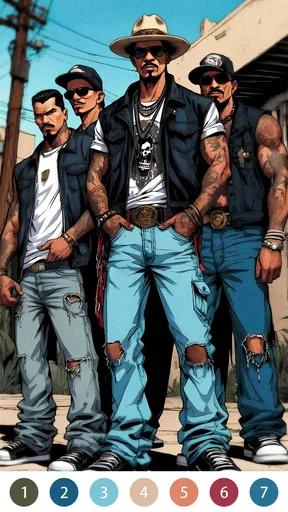

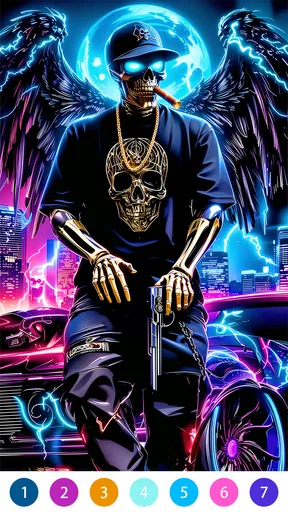
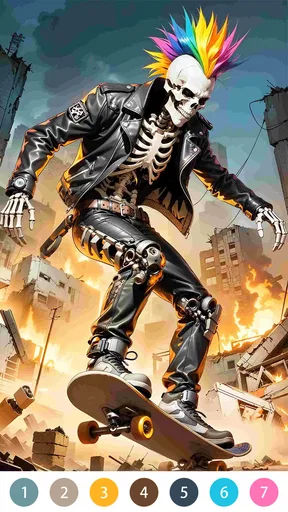

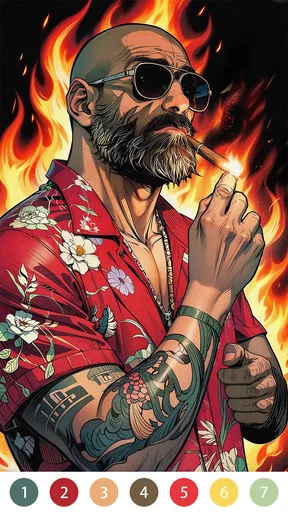

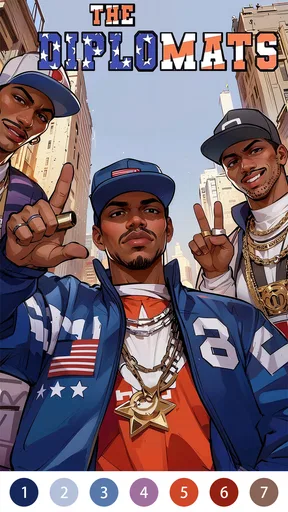
Our Review of Rebel Gangster Coloring Pages
 Analysis by Appyee
Rebel Gangster Coloring Pages is a free board game from Special Coloring Studio that takes a familiar coloring-book idea and gives it a tougher, more rebellious theme. I approached it less like a traditional competitive board game and more like a light, hands-on activity: choose a picture, follow the color-by-number structure, and gradually turn a plain design into a finished scene. That simple loop is the main reason to try it. It asks for attention without demanding the kind of constant reaction speed found in action games.
The game is aimed at Teen users, which fits the gangster-inspired presentation better than a child-focused coloring app would. I would not describe it as a serious crime simulation or a strategy game. Its appeal is the visual theme and the relaxing process of filling sections, not complex rules or deep progression. The app is free to start, while optional purchases range from $1.99 to $59.99 per item, so I would keep that in mind before handing the device to a younger player.
Color by number gives the gangster theme a clear purpose
I find the numbered format gives each gangster-themed picture a practical starting point: rather than wondering what to do first, I can choose one color and make visible progress. It also makes the activity easier to fit into a short break, since I can stop after a small section without losing a match or a complicated train of thought. That sense of direction is useful, though it also sets up a trade-off between guided completion and creative freedom.
The important capability is controlled coloring
The strongest part of the experience is the color-by-number format. Instead of opening a completely blank canvas and deciding every detail yourself, I can work through a picture one numbered area at a time. That small amount of guidance changes the mood of the activity. It removes the pressure of choosing a full palette while still leaving me with the satisfaction of creating the final image.
In practice, this makes the game approachable after a tiring day. I do not need to remember a rule set, plan several moves ahead, or compete against another player. I only need to identify the next color and locate the matching spaces. The gangster and rebel artwork gives that familiar mechanic a more dramatic identity than ordinary flowers, animals, or abstract patterns.
The real strength is the balance between direction and control. The numbers tell me where to begin, but the act of tapping each area still feels active rather than completely automatic. That distinction matters. A picture that simply fills itself would be closer to an animation; here, I remain involved in the completion process.
Why the theme changes the experience
A coloring app can easily feel interchangeable with dozens of similar titles. This one has a narrower visual personality. The rebel gangster angle gives the images a mood that should appeal to players who find conventional coloring books too soft or too young. I found that the theme also makes the finished pictures feel more like poster-style illustrations than casual doodles.
That focus is helpful if you already know what kind of artwork you want. You are not opening the game for a broad collection of unrelated subjects. You are choosing it because the streetwise, rebellious presentation sounds more interesting than a standard relaxation palette. If that theme does not appeal to you, the underlying coloring mechanic may not be enough to carry the whole experience.
How I use a picture without rushing
I get the best results by treating each image as a short session rather than trying to finish everything at once. I start with the larger, easy-to-recognize areas, then move toward the smaller sections. This creates visible progress quickly and reduces the chance of repeatedly searching through a busy design for one tiny number.
For detailed pictures, I also find it useful to change my pace instead of tapping randomly. I scan one part of the image, complete the matching spaces, and then move to another part. That workflow is less frustrating than jumping between distant details. It is a small habit, but it makes the color-by-number system feel more deliberate and helps me notice which portions of the artwork are still incomplete.
Another practical tip is to use the game as a low-pressure break rather than as a task to conquer. The appeal is in the repeated actions and the gradual change in the picture. If I focus only on finishing as fast as possible, the activity becomes mechanical. If I let the image develop section by section, the same controls feel much more calming.
What the game is like on a normal device
The listed minimum operating system is Android 7.0, so the game is not restricted to only recent Android phones and tablets. That makes it more accessible for people using an older spare device, although the experience will still depend on the screen size and general condition of the hardware. A larger display should make small numbered areas easier to inspect, while a compact phone is more convenient for quick sessions.
The current version is 1.2.293. For a player, the useful point is that the app is presented as an established, maintained game rather than a one-off coloring file. I would still keep the application updated through the normal store process, especially if a particular device has trouble displaying small areas or responding accurately to taps.
The best everyday scenario
My favorite use case is a short evening break when I want something more engaging than scrolling but less demanding than a full game. I can sit with the phone for a few minutes, select a rebel-themed picture, and complete a handful of sections. There is a clear visual result at the end, even if I do not finish the whole design.
It also suits waiting-room moments, a commute when I am seated, or a quiet pause between chores. The activity does not require a long uninterrupted story or a partner to play with. That makes it easier to stop and resume than many board games, where leaving halfway through a match can spoil the experience.
For parents considering it for a teenager, the age rating is worth taking seriously. The coloring format is accessible, but the gangster presentation is not designed as a preschool activity. I would look at the artwork and let the intended player decide whether the tone feels appropriate. I would also check purchase settings before allowing unsupervised use, because free installation does not mean every optional item is free.
Where it differs from ordinary board games
Calling it a board game can create the wrong expectation if you are looking for chess-like planning, a card match, or a competitive tabletop conversion. The board-game label describes the broader category, but the actual attraction is closer to interactive coloring. There is no reason to install it expecting opponents, elaborate tactics, or the tension of taking turns.
Compared with a blank drawing app, it is easier to begin because the numbered structure provides a ready-made route through the image. Compared with a traditional coloring book, it is cleaner and more convenient because I do not need physical pencils, an eraser, or a table. The trade-off is that I have less freedom to reinterpret the artwork. The game guides the colors instead of inviting me to redesign the picture from the ground up.
Compared with a puzzle game, it offers a gentler kind of concentration. A puzzle usually asks me to solve a problem and may punish mistakes or poor timing. Here, the challenge is mainly staying attentive while locating the correct sections. That makes it a better fit for relaxation, but a weaker choice for someone who wants constant intellectual pressure.
Trade-offs in the color-by-number approach
The same guidance that makes the game approachable can also make it feel restrictive. I enjoy having a clear color target, but players who prefer free expression may quickly want more control over shades, composition, or subject matter. The app’s identity depends on following the design, so it is not a substitute for a full digital art tool.
Small sections are another natural source of friction. On a phone, intricate areas can require careful tapping, and the experience is less comfortable if I am trying to work quickly with one hand. I recommend using a larger screen when possible, especially for a detailed image. A stylus may also make precise interaction more comfortable for some people, although the basic concept is clearly built around touch.
The free entry point is convenient, but optional purchases change how I evaluate the app over time. A casual user can try the core idea without paying upfront, while a committed user may be tempted by extra content or other paid items. Since individual purchases can reach $59.99, I would treat the app like any free-to-start title: review the purchase screen carefully and use device-level spending controls if necessary.
There is also a question of replay value. Coloring a picture can be satisfying once, but the long-term appeal depends on how much you enjoy the artwork and the repeated process. Players who need new mechanics, escalating challenges, or social competition may reach their limit sooner than someone who genuinely likes completing themed illustrations.
Three ways to get more from each session
First, I recommend using the largest visible color groups as anchors. Completing those areas early gives the image structure and makes the remaining details easier to interpret. This is more efficient than chasing every isolated number in the order I happen to notice it.
Second, I would avoid judging a picture too early. Rebel-themed artwork can look unfinished or visually uneven while only a few sections are colored. The contrast usually becomes clearer as the background, clothing, and smaller accents are completed. Waiting until the image is substantially filled prevents me from abandoning a design simply because its opening stage looks plain.
Third, I treat completed pictures as a reason to pause, not just a prompt to immediately open another one. Taking a moment to look at the finished composition helps me decide whether I actually enjoy the visual style. It also reveals whether I am using the app for relaxation or merely tapping through it out of habit. That distinction is useful when deciding whether optional purchases would add real value for me.
Who will gain the most from it
The best audience is a teenager or adult who likes rebellious illustration themes and wants an uncomplicated creative activity. It is especially suitable for people who enjoy coloring but do not want to carry physical supplies, and for players who prefer short, self-paced sessions over competitive matches.
It can also work for someone who struggles to start with a blank page. The number system acts like a gentle framework: I receive enough direction to make progress without needing to invent an entire design. That makes it less intimidating than open-ended drawing and more personal than simply watching a finished image appear.
I would skip it if my priority is strategic board-game depth, multiplayer interaction, or unrestricted artistic control. A conventional board-game app would be a better choice for tactical decisions, and a drawing application would suit someone who wants to choose every color and line. This title is most convincing when its limits are exactly what you want: a defined picture, a clear sequence, and a distinctive gangster atmosphere.
Value, audience, and my final recommendation
The game is free to install, and its public reception is strong, with a 4.8 average from over a hundred ratings and more than ten thousand installs. Those figures suggest that the focused concept is connecting with an audience, but they do not change the basic decision: you should choose it for the coloring experience and theme, not because it behaves like a deep traditional board game.
Special Coloring Studio has made a narrowly defined product rather than an all-purpose art suite. That is a positive when I want a quick, guided activity with a rebellious visual flavor. It is a limitation when I want broad variety, competitive play, or complete control over the final image. The Teen rating and optional purchases also mean it deserves a little more supervision than a simple children’s coloring book.
My recommendation is straightforward: try it if the gangster coloring concept sounds appealing and you enjoy gradual visual progress. Start with short sessions, work from large areas toward small details, and decide whether the artwork keeps you interested before spending on optional items. For the right player, the satisfaction comes from turning a numbered outline into a finished rebel-style picture without the pressure of a conventional game.
That makes Rebel Gangster Coloring Pages a pleasant, specialized choice rather than a universal recommendation. I would keep it installed for quiet breaks and creative downtime, while reaching for a different app whenever I want strategy, competition, or unrestricted drawing.
Privacy and Permissions
See what permissions an app requests and how it handles your data.
- Identity
- find accounts on the device
- Contacts
- find accounts on the device
- Phone
- read phone status and identity
- Photos/Media/Files
- read the contents of your USB storage, modify or delete the contents of your USB storage
- Storage
- read the contents of your USB storage, modify or delete the contents of your USB storage
- Wi-Fi connection information
- view Wi-Fi connections
- Device ID & call information
- read phone status and identity
- Other
- view network connections, full network access, run at startup, set wallpaper, control vibration, prevent device from sleeping, Google Play license check, read Google service configuration
Verdict
Strengths of Rebel Gangster Coloring Pages
- Simple controls make coloring accessible for children and beginners.
- Offline play allows coloring without a constant internet connection.
- Bright artwork provides a fun, engaging creative activity.
- Color choices encourage experimentation and personal expression.
- Suitable for short, relaxing play sessions on mobile devices.
Limitations of Rebel Gangster Coloring Pages
- Some pages or features may require in-app purchases to unlock.
- Ads can interrupt the coloring experience, especially in the free version.
- Artwork may feel repetitive for older children and experienced users.
- Limited creative tools may disappoint users seeking advanced coloring options.
- The gangster-themed designs may not appeal to every child or parent.
Other Releases by Special Coloring Studio
View All
Abstract Surreal Coloring Game
Board4.6

Crazy Color: Color by Number
Board4.8
Similar Picks in This Category
View All
Ludo King®
Gametion4.1

Ludo
Yarsa Games4.6

Tile Master® - Matching Game
Higgs Studio3.6

Checkers Online
CC Games4.6

Dominoes
Loop Games4.7

Chess
Chess Prince4.6
Frequently Asked Questions
What is Rebel Gangster Coloring Pages?
Rebel Gangster Coloring Pages is a digital coloring app centered on urban, rebellious, and gangster-inspired artwork. It lets users select illustrations, fill them with colors, and create personalized designs directly on a mobile device. The app is aimed mainly at users who enjoy street-style art, character coloring, and relaxing creative activities rather than traditional drawing lessons or advanced graphic design.
Is Rebel Gangster Coloring Pages free to download and use?
The app may be available as a free download, but some editions can include advertisements, optional purchases, locked artwork, or premium features. Availability and pricing may differ between Android and iOS, so it is worth checking the store listing before installing. Users should also review whether the app offers enough free pages for their needs and whether purchases are required to remove ads or unlock the complete collection.
Is Rebel Gangster Coloring Pages suitable for children?
Parents should preview the artwork before allowing younger children to use the app. Although coloring itself is simple and family-friendly, the rebel or gangster theme may include characters, clothing, symbols, or visual elements that are more appropriate for teenagers and adults. It is also important to check the app’s age rating, advertising content, in-app purchase settings, and privacy information before giving a child unrestricted access.
What features can users expect while coloring?
Users can generally expect a selection of themed coloring pages, a palette of colors, touch-based filling or drawing tools, and options to undo changes or start over. Depending on the version, the app may also allow users to save finished pictures, share them, zoom into detailed areas, or continue working on previous designs. The exact tools can vary, so users seeking advanced brushes or professional editing should check the current feature list.
Does Rebel Gangster Coloring Pages work offline?
Basic coloring may work without a continuous internet connection once the application and any required artwork have been loaded. However, an internet connection may still be needed for downloading new pages, displaying advertisements, completing purchases, sharing images, or accessing online content. Offline behavior can differ by version and device, so users who plan to color while traveling should open several pages in advance and test the app with connectivity disabled.
Play our best games!


